Showing posts with label spreadsheet. Show all posts

Friday, August 21, 2015

Go With the Flow

Now that you hopefully are on your way to a better organized work space, you need to take a moment to analyze how you spend your time in your writing space—and better yet how writing fits into your daily routine.

Whether you're driving your car to go pick up the kids from school or shooting a few hoops on an afternoon break, churning out an article or researching a book, the ability to get in the groove so that you're working with time instead of against it is the key to increasing your productivity. Psychologists call this transcendent marriage between time and the mind flow, and when you get flow. you're good to go.

But first you have to find your flow taking control of your time and eliminating the interruptions and time wasters that waste so much of it during your day. Be prepared for good news and bad. The bad news is that unless you're practicing good time management or are a very organized person—most people aren’t—you probably waste a lot of time. The good news is that once you find that time, you can reclaim it. The extra minutes and hours are a gift, something you shouldn’t squander.

Keep track of everything you do in an average work day. Jot down each activity. Then take a red pen and circle anything that was, in light of your values and goals. a waste of time, even a phone call to a friend. How can you get these time wasters out of your day? Or at least take better control of them. For instance, you could talk to your friend after dinner.

Most people spend their time on things according to their priorities. How about you? Does anything stand out? Too much time texting on your smartphone? Too little time for yourself or with your family or friends or on your current writing project?

And don’t forget procrastination (We’ll take a look at that next week.) How much time did you spend procrastinating? How many interruptions did you have? What kind? Who were they with? Are there things you shouldn't have been doing because the activities could have been delegated or you simply should have simply said, "No"?

If you spend much of your time complaining about not having enough time to get things done, then perhaps you’re not doing those last two things—delegating and just saying no. By the way, that phrase just doesn’t have to do with drugs.

Look to see if you can bundle certain activities together? With the high price of gas, many people are grouping their errands by location so as not to be running all over the place. Try consolidating some tasks. Is it possible to get all your paperwork out of the way at once? Can you set aside a morning to take care of marketing calls and Emails?

And speaking of Email, how many times a day do you check it? For the average person, looking over and replying to their mail can take up to an hour each time. If you check your mail four times a day, that’s four hours you’re spending reading and corresponding. And if you’re constantly checking messages on your smartphone, who knows how much time you spend on your mail.

To find out how you actually spend your time, you’ll need to keep a Time Log—a record of all the time you spend on every little thing, from the moment you rise in the morning until you put your head down on the pillow at night. A Time Log is a powerful tool for discovering how you allocate the minutes and hours of your life. Sounds tedious, but once you do it, you’ll be able to take better control of your time.

To start your Time Log, take a sheet of ruled paper. In the left-hand margin, note the time you change activities, and on the line to the right list exactly what you're doing: getting ready for work or bed, projects or paperwork, making calls, talking to visitors, attending meetings, reading mail, making or eating meals, walking the dog, watching TV, and so on. Also note who else may have been involved so you can later determine how relevant each activity was to your goals and who tends to take up your time the most.

If your more computer savvy, you can create a spreadsheet, making each row on the sheet represent a 15-minute time block. Many people find this easier because the blocks remind them to log what they were doing. Accounting for time accurately on the computer spreadsheet can be harder, however, because not all activities neatly fall into 15-minute blocks. Whether you log an entire week including a weekend is up to you.

And, yes, keeping a Time Log, even for a couple weeks is a hassle, but it’s a hassle worth considering.

Monday, February 17, 2014

There’s Something to be Said for Routine While Working a Day Job

Many beginning writers work a day job while working on improving their craft. Some get up extra early and write before leaving for work. Others work after dinner when they get home. But either way, their writing often suffers because the majority of the day when their mind and body are fresh, they’re working for someone else.

It’s hard to juggle a full-time job with writing. There are only so many hours in the day. So how do you work a job that drains your creative energies and still get your writing done? The answer is simple—routine.

Everyone does a few things by routine—brushing their teeth, showering or bathing, even eating. While working in a routine can seem humdrum, it’s a way to get organized and get more things done in a limited amount of time.

Before you can work out a routine for your writing, you need to figure out what you need to get done. Make a list of your typical writing chores—everything from thinking up and jotting down ideas to researching them to applying that research to your writing to the writing, itself. You can’t do all of these things every day, and you probably don’t need to. Allot a certain amount of time to each type of chore. Some will take just a few minutes while others may take several hours. Divide up the ones that take longer to do, such as writing an article or story, and divide them up into segments that you can work on daily.

It’s actually a better idea to write for shorter periods of time rather than in long stretches, so dividing up your writing, and perhaps your research times will most likely help you in the long run.

Take a look at your daily schedule. You probably don’t think about that much. Instead, you get up, clean up, eat breakfast, go to work, work at your job, eat lunch, work more at your job, go home, eat dinner, relax, and go to bed. The next day you start that basic routine all over again.

What you need to do is work your writing chores into that already established routine. You probably don’t think you have any time, but if you analyze your daily schedule, you may find that you have quite a few blocks of extra time that you could spend doing one or two writing chores.

Map out a schedule—create a spreadsheet of it so you can carry it with you. One good thing about all the technology that’s around you is that you can use it to your advantage. To paraphrase an old saying, “You can take it with you”—your writing, that is. (More next week on using technology to expand your writing and create a portable office.)

Begin by blocking in all the necessary things you need to do every day—washing, eating, cleaning, driving kids places, and working at your job. Study what you do for a week to see how long it take you to say eat breakfast. Do the same with all the other things you have to do. Then adjust your spreadsheet schedule for the times you’ve discovered.  What’s left is the time you have for writing chores. At first it may not look like you have any time left. But look again.

Can you add time anywhere—get up an hour earlier or go to bed an hour later, take less time for lunch, take less time for relaxation or relax while doing lighter writing chores like thinking of ideas or even researching online?

Now add writing chores into your schedule. Work up a routine. For instance, housewives used to reserve Mondays for wash day, Tuesdays for ironing, Wednesdays for cleaning bedrooms, Thursdays for cleaning living and dining areas, Fridays for food shopping, etc. You need to do the same with your writing chores. Assign particular chores to particular days of the week. And do them only on those days whenever possible. In addition, you need to allot time for writing every day or every other day. If you’re schedule is packed, then write for a time on weekends.

While this may sound like a lot of work, it will take a while to establish a writing routine, just like it has taken a lifetime to establish your daily routine. You’ve got to re-educate yourself so that writing becomes an integral part of your daily life, not just a once-in-while pastime.


Friday, February 15, 2013

Bookkeeping Tips to Make Your Life a Little Easier

For many writers, bookkeeping can be a drudge. But there are ways to streamline it and make it easy enough that it won’t dominate your life.

No matter which of the three bookkeeping systems you choose—simple checkbook, single-entry journal, or the more complicated cash-disbursements journal—you’ll also need to have an easy way of filing  backup receipts. You should have something—receipt, invoice, canceled check or petty cash ticket—for every expense. Make sure before filing these receipts that they indicate all of the important information—date and amount paid, to whom paid, check number or cash payment. Keep these receipts for business expenses filed separately from any personal expenses. You can use one of those accordion files divided into 12 compartments—one for each month—or 12 envelopes or a box in which you store receipts in monthly bundles. Whichever way you choose, be consistent.

The first step in recording your expense receipts is a program like Expense Director from Iambic.com. This program allows you to record your expenses on your smartphone or personal assistant. Then you can sync the device you’re using to your computer to save and store your expense notations. After you record your expense amounts, place the receipts for that month in a box. Make sure to put a check mark on each receipt after you record it. At the end of the month, bundle that month’s receipts for storage.

A program like Expense Director allows you to create spreadsheets of monthly expenses easily and quickly. You can also sort your expenses so that you have all like expenses together. If you don’t have a spreadsheet program, get one. It comes in handy for lots of other records, too.

All funds received or disbursed from your freelancing business should pass through your business checkbook. Your monthly bank statement should be balanced against your receipts/disbursements spreadsheets, as well as verifying your checkbook balance.

Record all cash receipts in the proper column by category. If you're working part-time, you can keep the data in the same spreadsheet, but keep the receipts in a separate column. If you regularly receive rent or other such income from another source, separate those receipts also.

Record gross receipts and net receipts, if you have both, at the same time for more ease in figuring your taxes. Be accurate when you record figures across the page. They need to balance both horizontally and vertically. You’ll want to balance each page monthly, then record the balances on the balance spreadsheet.

You’ll find it handy to have a calculator with a printout tape. It’s also helpful as proof of balances during any tax audit. As you balance each page of your spreadsheet, you can file the tape with your backup material—receipts, invoices, petty cash tickets, etc.

If you’re following the above procedures, you’ll be able to check your accounts receivables each week which will let you know if you have any slow payers. You’ll also be able to check you accounts payables, your bills, to see if you can pay ahead to take advantage of any discounts.

And every month, you’ll need to post your income and expenses and balance your books. You’ll also need to prepare a profit and loss statement, balance your business checking account, balance and file any petty-cash receipts, and do anything to prepare for taxes. And one last thing: You’ll need to rebill any slow payers. Doing all of this should keep you on financial track.

Friday, March 2, 2012

Tools of the Trade

Back in the good ole days—were they really as good as everyone thinks—writers used quill pens, then pens of other sorts and paper to put down their thoughts. Eventually, the typewriter appeared. This invention made work for writers like Mark Twain, one of the first to own one, much easier.

The standard typewriter dominated the writer’s tool kit until the mid-20th century. Soon the old hunt and peck model became electrified, enabling writers to work faster because its powered keys required a lighter touch.

Just when the electric typewriter—the IBM Selectric, with its rotating and interchangeable font ball, topped the list—the electronic typewriter, with its computer-like keyboard appeared. Writers wondered how life could get any better.

Well, it did. With the invention of the personal computer, writers’ productivity increased tenfold. Not only were the keyboard keys extremely light to the touch, but also this machine could store documents for future use and reworking. Editing, formerly a long and laborious process of marking up printed papers, soon achieved great speed through copy and paste techniques.

Over the past 25-30 years of my writing career, I’ve seen and tried them all. I entered my career with a big, old, black, clunky Remington typewriter, followed shortly thereafter by a sleek Corona portable. I hated typing. Each character required so much effort. For a while I rented an IBM Selectric and fell in love with it. After my first article sold to Popular Mechanics Magazine, I took the money and bought myself a Brother Electronic typewriter. This was even better than the IBM I had been using.

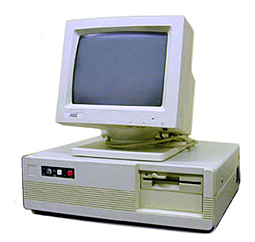
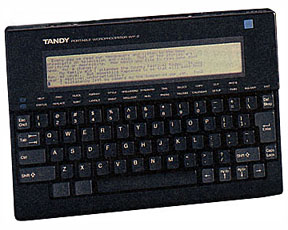
But in 1989, that all changed for me, for that’s when I entered the Computer Age. My first, a generic IBM compatible XT clone, seemed like something out of the far future. My productivity took a quantum leap. After that, I purchased a new desktop about every three years—my attic is literally a virtual museum of computing. I also purchased a Tandy portable wordprocessor that helped me to tackle notetaking on the go. I added several laptops to the mix, plus a computer just for my photographic work. And that’s only the hardware.

Along with all the various computers came a myriad of software—wordprocessors, spreadsheet programs, photo editing programs, you name it. I felt as if I was on a Tilt-a-Whirl at times. No sooner did I learn a program, then a new version came out, eventually making my work even more productive.

And that’s the key—productivity. As a writer, it’s imperative to keep up with the latest technology, the tools of your trade. While you don’t have to purchase the latest and greatest computers or software, you should have examples of each that make your work easier. If you’re still writing on a legal pad, then it’s time to make the leap.

To give you an idea of what you could be doing, let’s jump to the present. I no longer go to computer stores to buy equipment. Instead, I purchase lease-back, refurbished Dell desktops, complete with a later version of Windows, from Computer-Show.com. I’ve purchased four of these powerful systems from them for about $300 each and love each one. Since I began with computers that used floppy disks and newer computers today don’t have them, I make sure that my systems all have them. In addition, I also have CD and DVD players and writers that make my systems truly multimedia.

My laptops are all the same make and model IBMs. This allows me to use them and their accessories interchangeably. I do lectures and seminars as part of my work and these allow me lots of flexibility.

Software is a big part of my writers tool kit. Corel WordPerfect X-4, the latest version, is the cornerstone. It allows me to work and read files in both WordPerfect and that other nasty program, Microsoft Word. I also use Dragon Naturally Speaking, a speech-to-text program that helps me take notes from books and convert my handwritten notes to digitized text.  Using these programs, I was able to produce two books of over 100,000 words, each in 10 weeks. With my old systems and programs, that would have been impossible.

Other programs, like Iambic’s ExpenseDirector, incorporated into my Palm Pilot, allow me to keep records of all my expenses—a true boon at tax time. A program called Paperport allows me to use my computer and scanner as a copy machine. And either Corel WordPerfect or Adobe Acrobat allow me to convert my manuscripts to PDF files for producing e-books.

As a freelance writer, I’m both a writer and a business person. I’ve set my office and tools up with care so that my productive capacity is as high as it can be. And high productivity using the best tools you can afford equals higher profits.